How to hand over the front desk using one reservation record
Use Stayelier’s room calendar, reservation details and housekeeping view to give the next shift a clear starting point for arrivals and open requests.

The essentials
- Start from the room calendar and open the reservation behind each arrival that needs attention.
- Check room readiness separately from the guest’s requested arrival time.
- Give unresolved work an owner and follow-up time in your agreed handover process; a PMS screen alone does not assign responsibility.
Prepare the handover before the shift ends
The late shift is taking over. One guest has asked to arrive early, another needs a room change and a service request is still waiting for an answer. The useful handover is the current position of each stay and the next action, with the reservation record close at hand.
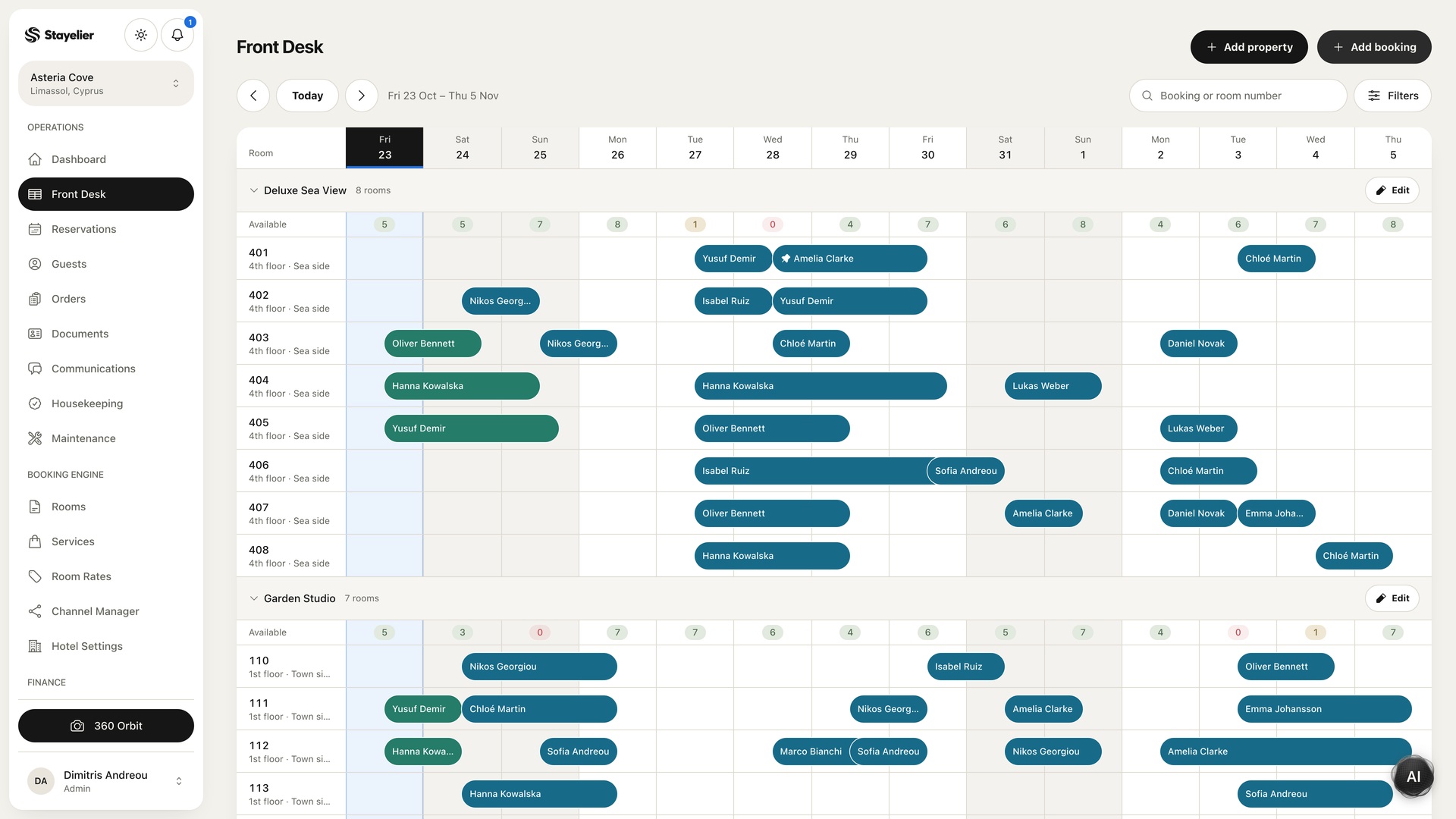
In Stayelier, the front desk calendar shows stays against physical rooms. Open a reservation to review the guest, dates, room assignment, rate plan, extras and payment balance. Build the handover around those records so colleagues can find the details without copying guest information into a second document.
Cover arrivals, departures and room readiness
- List arrivals that need a decision: unconfirmed early access, a changed room assignment or an unresolved booking question.
- Confirm which departure changes affect room turnover and tell housekeeping about the operational impact.
- Check rooms that are on hold or awaiting inspection. Name the person who can confirm the next status.
- Identify outstanding guest requests and distinguish a requested service from one that the team has confirmed.
A request recorded in a note is not automatically a promise to the guest. Make the confirmation state explicit, especially when availability depends on another team.
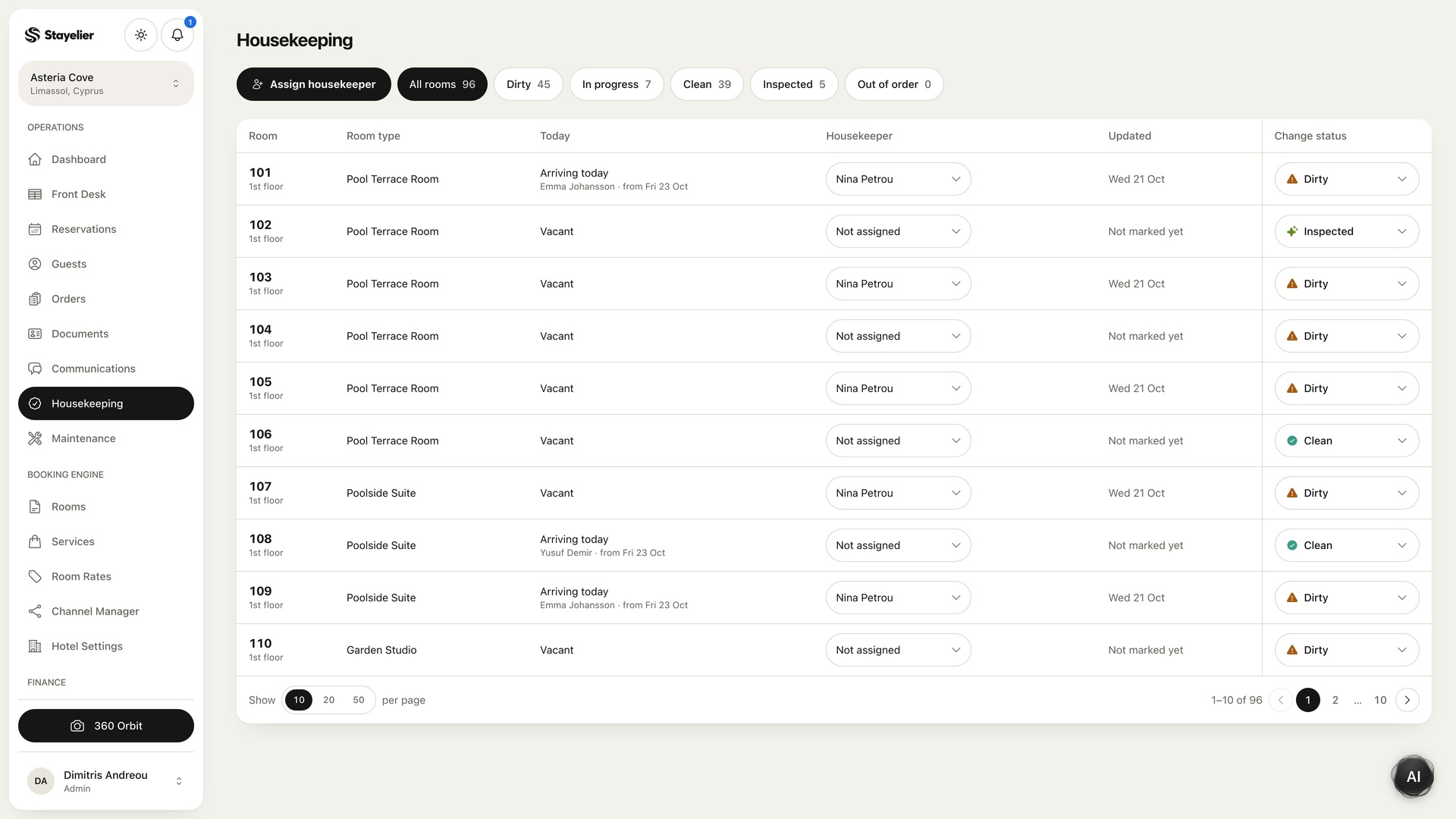
Stayelier’s housekeeping workspace records dirty, cleaning, clean and inspected states, assigned housekeepers and room notes. Use that shared view when an arrival depends on room readiness. An early-arrival request is not a readiness confirmation, and a room assignment does not show that cleaning has finished.
Write open actions so someone can continue them
| Field | What to record |
|---|---|
| Reference | Room, reservation or task reference in the approved system |
| Current position | What has been confirmed and what is still unknown |
| Next action | The specific decision or task required |
| Owner | Person or team responsible for the next step |
| Follow-up | When to check again or escalate |
For example: “Arrival reference ABC: guest requested a cot; availability not yet confirmed; housekeeping to check stock; reception to update the guest after confirmation.” Avoid recording unnecessary personal information, payment card details or access credentials in the handover.
Hypothetical handover: the incoming receptionist opens the same reservation, sees its room assignment and checks that room’s housekeeping state. Your handover record names the colleague checking the cot request and the time reception will update the guest. These are team procedures, not a claim that Stayelier automatically creates or escalates a handover task.
Confirm the handover together
- Open the room calendar together and identify arrivals or departures with unresolved decisions.
- Open the relevant reservation and review its dates, assigned room and outstanding balance.
- Check the housekeeping workspace for any room whose readiness still needs confirmation.
- Review the separate handover actions, owners and follow-up times, then confirm that the incoming colleague can access the necessary records using their own account.
For a lone night shift or an asynchronous handover, use an acknowledgement and a clear escalation contact. Define the fallback before a busy day, rather than expecting a colleague to infer it from a note.
Keep the checklist short enough to use
Review recurring handover gaps in a brief team discussion. If room readiness causes repeated questions, agree the status definitions with housekeeping. If guest requests are lost, clarify where requests become assigned work. Fix the underlying workflow before adding another reminder.
Connect the handover to the housekeeping routine
The completed handover should leave the incoming shift with a clear starting point: what needs attention now, what can wait and where to find the authoritative record.