How to present optional hotel booking extras clearly
Help guests understand what is included in a room rate and what an optional hotel extra costs before they confirm a direct booking.

The essentials
- Keep the room price visually distinct from optional extras and their charges.
- Explain the unit and timing for each extra, including whether it is per stay, person or night.
- Check the booking summary against the selected extras before confirmation.
Separate the room rate from the extras
A guest comparing two rooms should be able to tell what the room itself costs before deciding whether to add breakfast, parking or another service. Show the selected room rate and its policy first. Present optional services as choices with their own prices, not as part of the room rate unless they are included.
| Question | Example wording |
|---|---|
| What is it? | Breakfast for one guest |
| Is it optional? | Optional add-on · not included in the room rate |
| How is it priced? | €18 per person, per day |
| When is it provided? | For each morning of the selected stay |
| What will the guest pay? | Show the selected quantity and calculated total in the booking summary |
The example wording is illustrative. Use the property’s actual service description, price, tax treatment and fulfilment rules, and make the total calculation consistent with the guest’s selection.
Write a useful description
- Name the service in language guests already use.
- State who or what the price applies to and whether it repeats each day.
- Explain relevant limits, such as service hours or availability, before selection.
- Say whether the guest can change the choice later and how to ask, if the property has confirmed that process.
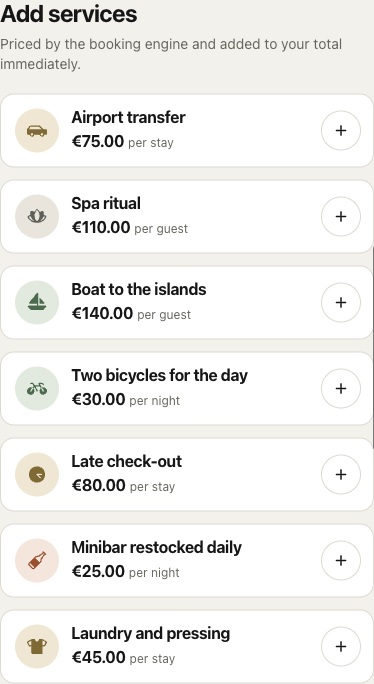
In Stayelier’s direct booking flow, guests can review available services alongside their room choice and see selected extras in the reservation summary. Confirm that each configured service matches the property’s actual offer before publishing it.
Review the full amount before confirmation
- Choose dates, guests and a room as a guest would.
- Add one optional service and confirm the quantity and price basis.
- Check that the room rate and extra remain separately named in the summary.
- Review the final reservation details and make sure the confirmation reflects only selected services.
- Repeat with no extras and with a different stay length to catch unclear pricing units.