A hotel housekeeping checklist that keeps reception informed
Connect arrivals, cleaning assignments and inspection with Stayelier’s housekeeping board, so reception can check the room’s current status.

The essentials
- Set cleaning priorities using the arrival plan, then assign the room work to a housekeeper.
- Stayelier tracks dirty, cleaning, clean and inspected states; agree who confirms each transition.
- Give unresolved room issues an owner and check them before confirming readiness to a guest.
Start with arrivals and exceptions
A guest reaches reception before the usual check-in time. Their assigned room has been cleaned, but nobody has confirmed inspection. Reception needs the room’s actual state and the person checking it. This checklist connects the arrival plan to the room work using Stayelier’s housekeeping and front desk views.
- Review expected arrivals, requested arrival times and room assignments with the front desk. Treat an early arrival request as a request until readiness is confirmed.
- Separate departures from stayovers and respect the hotel’s rules for occupied rooms and do-not-disturb requests.
- Flag maintenance holds, missing supplies and rooms that need a second inspection before assigning the remaining work.
- Give urgent rooms an owner and a realistic update time. Revisit the order when departure or arrival information changes.
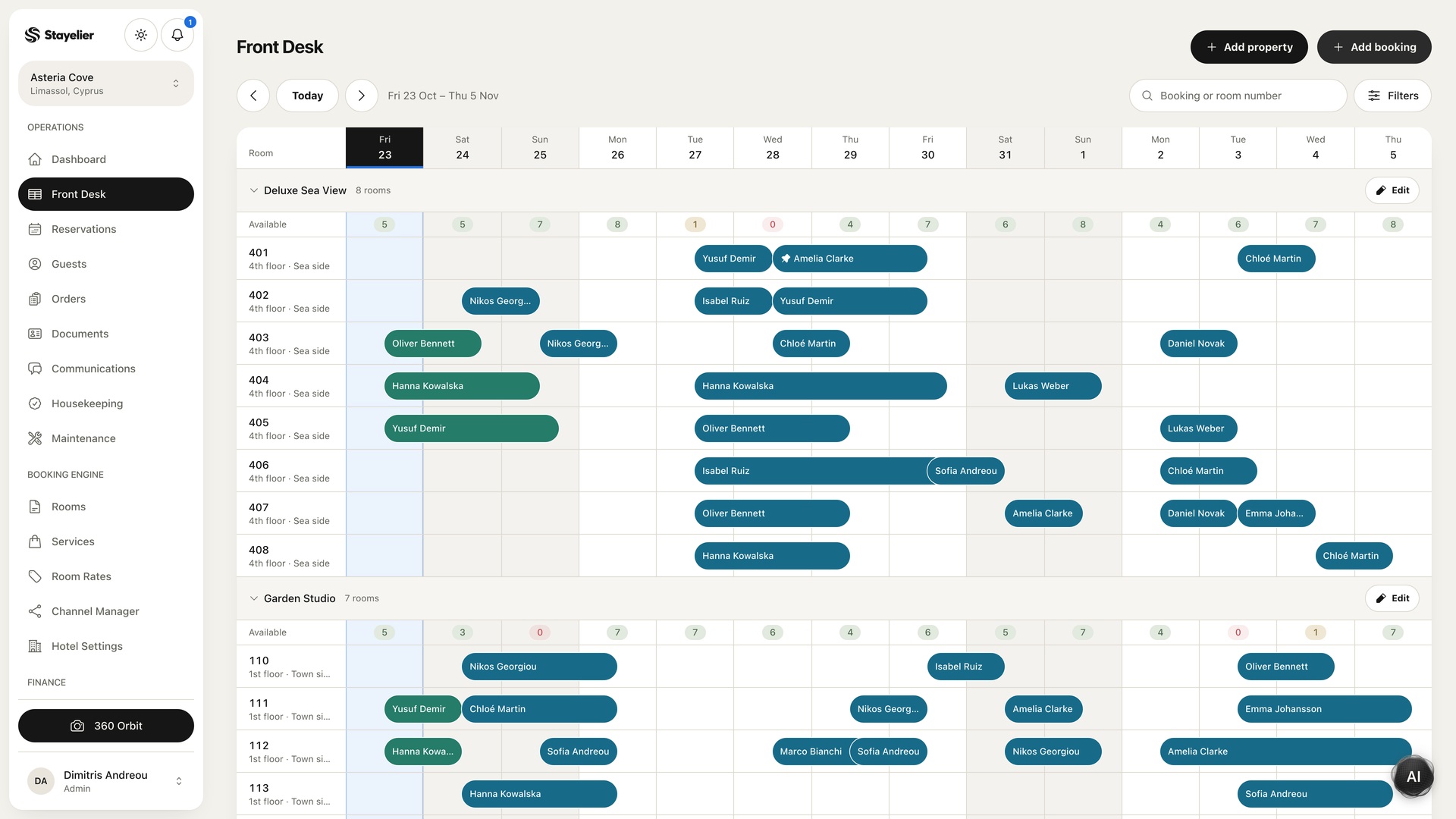
Start with the front desk calendar to review the day’s room assignments and stays. Agree the order with housekeeping, including any early-arrival requests and rooms with unresolved issues. The team sets the priorities; do not assume the calendar has automatically approved an early check-in.
Use one repeatable room checklist
Keep the detailed cleaning procedure specific to your property’s rooms, equipment and approved methods. Use Stayelier to coordinate the room’s status, assigned housekeeper and notes. A status board helps colleagues understand progress; it does not replace the physical cleaning and inspection checks.
- Check that the room may be entered under the property’s access procedure. Identify damage or maintenance needs before work starts.
- Complete the room and bathroom turnover using the approved procedure and replenishment quantities.
- Check the guest-facing details: bedding, towels, amenities, room information and the equipment the hotel promises.
- Record unresolved issues and leave the room in the correct status. Do not mark a room ready while a blocking issue remains.
Agree what each room status means
Stayelier’s housekeeping board follows rooms from dirty through cleaning to clean and inspected. Agree with reception what those states mean at your property. In particular, decide whether an inspection must be complete before reception confirms that a room is ready.
| State | What the team records | Next check |
|---|---|---|
| Dirty | Room still needs its cleaning work | Confirm access and the assigned housekeeper |
| Cleaning | Room work is in progress | Finish the property’s room checklist and record unresolved issues |
| Clean | Cleaning has been completed | Complete any required inspection before confirming readiness |
| Inspected | The inspection stage has been completed | Check for any remaining blocking issue before promising the room |
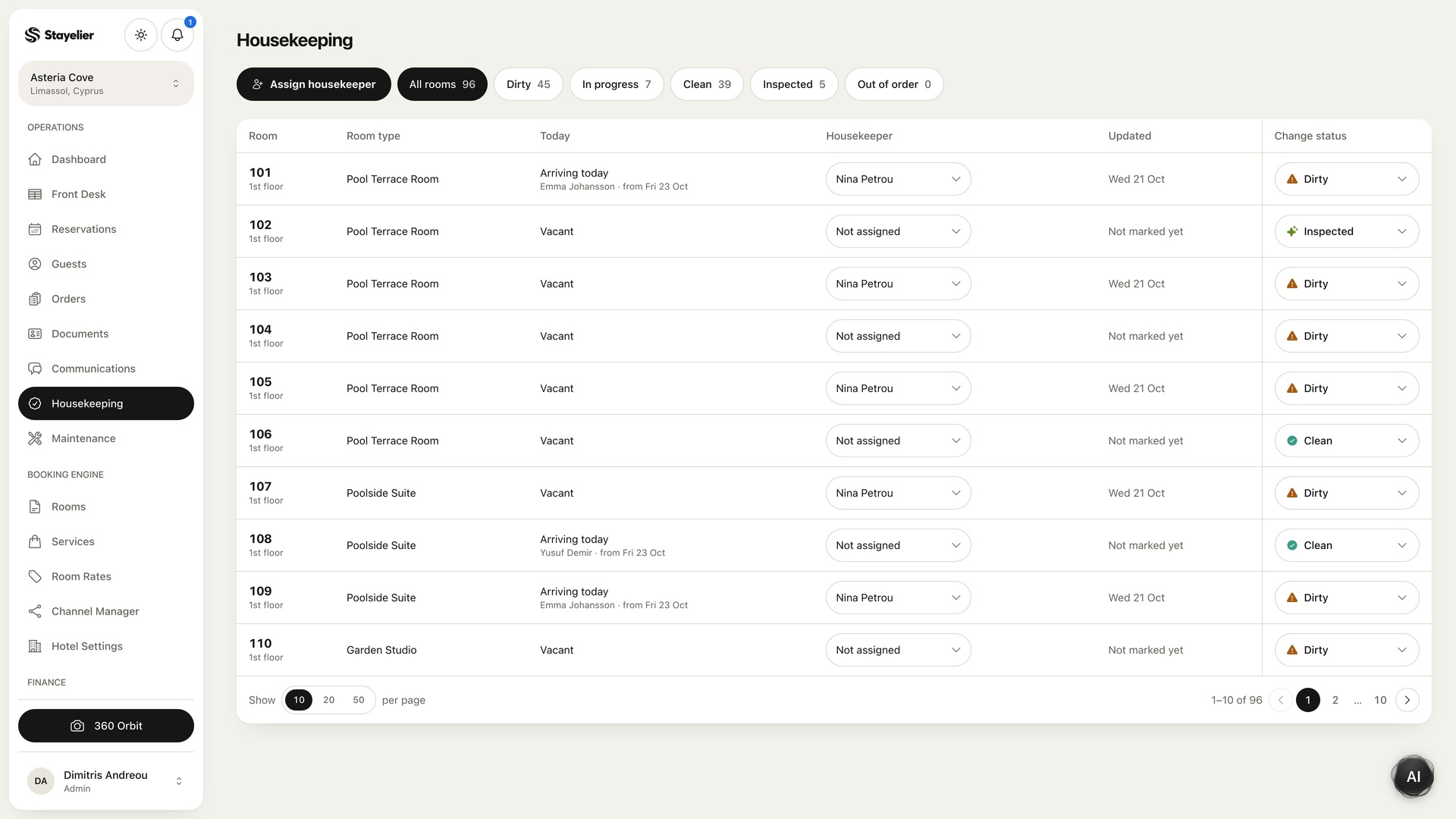
Hypothetical example: a room is clean but a lamp replacement is still pending. Keep that exception visible in the room notes and agree who will resolve it. A cleaning state by itself is not permission to ignore a blocking maintenance issue.
Hand over exceptions with an owner
An exception needs more than “not ready”. Record the room, the issue, the next action, the person responsible and when an update is expected. Keep the entry factual and use the hotel’s approved system for any guest information.
For example: “Room 204: lamp replacement pending; maintenance assigned; front desk to check again at 14:00 before confirming readiness.” This is an illustrative handover entry, not a promised completion time. An incoming colleague can act on it without repeating the investigation.
Use the front desk handover checklist
Review the routine after a busy day
Ask which rooms changed priority, which issues were discovered late and which updates the front desk had to chase. Adjust the checklist when the same gap repeats. Add a step only when it prevents a real ambiguity; a checklist that is too long to use during a busy shift will not help.
Start with one shift, collect feedback from housekeeping and reception, and agree the final wording together. The goal is a shared view of readiness that the team can keep current throughout the day.