How to test whether your minimum-stay rule blocks the right bookings
Check a minimum-stay rule with a worked date-and-length matrix, then investigate inventory and closures separately when a booking search fails.

The essentials
- Test stays arriving before, on and after the restricted date—not just stays starting on it.
- Separate passing the minimum-stay rule from being bookable: inventory, rates and closures need their own checks.
- Record expected and observed results for the same room type, rate plan and guest count.
Write the intended rule before testing
To check hotel minimum stay restrictions, search dates that should be blocked and dates that should remain available. A successful three-night search alone does not show whether the rule also blocks the wrong two-night stays.
First write one precise sentence. Hypothetical example: “For the Double room’s Flexible rate, require at least three nights for arrivals on December 12, 2026.” A different intention is: “Require at least three nights for any stay occupying the night of December 12, 2026.”
Booking.com documents this distinction as arrival-based versus stay-through restrictions. Its restrictions are scoped by room type, rate plan and date. These are documented Booking.com behaviours, not verified Stayelier restriction modes. Confirm how your provider represents your intended rule rather than inferring it from a calendar label.
Booking.com: restriction scope and arrival-based versus stay-through rules
Establish a clean test baseline
Use an agreed test environment. Record the room type, rate plan, guest count, affected date, minimum nights and intended scope. Keep those choices fixed across searches.
- Confirm sufficient sellable inventory for every occupied night in the test range.
- Confirm the selected rate is available throughout each test stay.
- Record room-type and room-and-rate closures separately.
- Check arrival and departure restrictions and any other stay-length rules.
- Record the settings checked, test time and reviewer.
Booking.com documents inventory separately from length-of-stay restrictions, and arrival and departure restrictions separately from minimum stays. It also explains that a room-type closure can prevent booking even when individual room-and-rate combinations are open. Meeting a minimum stay therefore does not establish bookability.
Booking.com: inventory, closures and separate booking restrictions
Run the date-and-length matrix
Hypothetical test: a three-night minimum applies to December 12, 2026, for one room type and rate plan. Assume sufficient inventory, an available rate throughout and no other restrictions. Each date range below runs from arrival to departure; the departure date is not an occupied night.
Choose the expected-result column matching your intended rule before testing. “Pass” means passes this minimum-stay rule only; “block” means this rule should prevent the stay. The expectations apply the documented Booking.com distinction, not observed Stayelier results.
Booking.com: minimum-stay rule definitions behind this example
| Arrival | Departure | Nights | Arrival-only intention | Stay-through intention | Observed result |
|---|---|---|---|---|---|
| December 11 | December 12 | 1 | Pass | Pass | Not run |
| December 11 | December 13 | 2 | Pass | Block | Not run |
| December 11 | December 14 | 3 | Pass | Pass | Not run |
| December 12 | December 14 | 2 | Block | Block | Not run |
| December 12 | December 15 | 3 | Pass | Pass | Not run |
| December 13 | December 14 | 1 | Pass | Pass | Not run |
December 11–13 is the distinguishing search: it arrives before the restricted date but occupies that night. December 11–12 checks the departure boundary. December 13–14 checks that a short stay after the affected night remains outside this rule.
Compare the rate calendar with the guest search
In Stayelier, the rate calendar lets staff review nightly prices and inventory by room type and date, manage stay restrictions and close sales for selected dates. Use it to inspect the settings behind your test range.
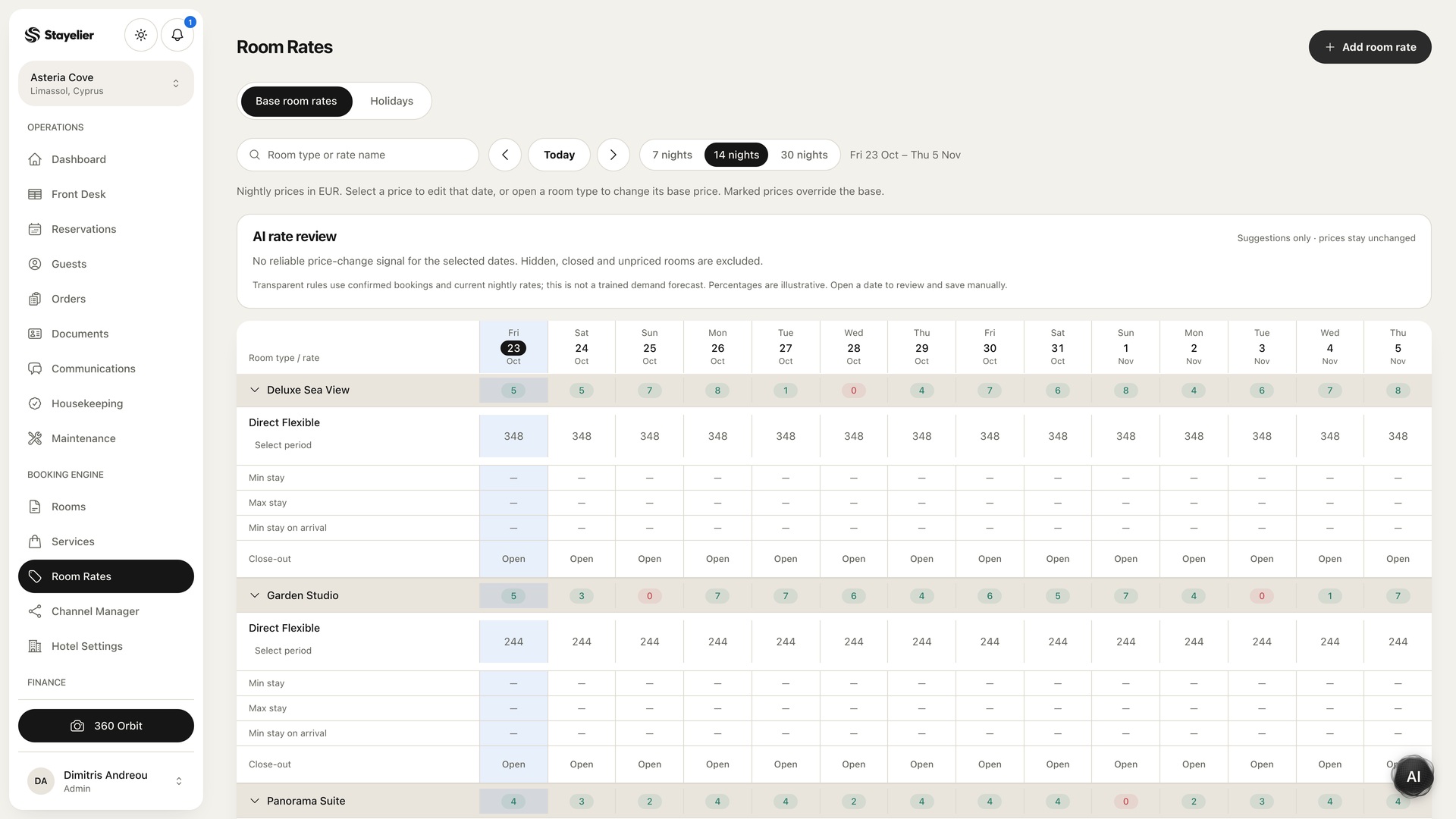
Then repeat each search in the guest booking journey, keeping the room type, rate plan and guest count unchanged. Stayelier lets guests search dates and compare rooms and rates, with availability and price rechecked before confirmation. Stop before submitting unless you have agreed a safe test-booking setup.
Record what the search actually showed
For each matrix row, record whether the specific room-and-rate combination appeared, any restriction message, the test time and reviewer. Another room or rate appearing is not a pass for the combination under test. Do not record an unavailable result as proof that the minimum stay caused it.
| Field | What to enter |
|---|---|
| Expected result | Pass or block under the selected intention |
| Observed result | Exact room-and-rate result and displayed message |
| Baseline recheck | Inventory, rate availability and separate closures checked |
| Outcome | Matches, mismatch or pending investigation |
| Follow-up | Owner, next action and recheck time |
Investigate mismatches one setting at a time
- Confirm that the searched room type, rate plan, dates and guest count match the test record.
- Recheck inventory and rate availability for every occupied night.
- Check room-type closures, room-and-rate closures, arrival restrictions and departure restrictions separately.
- Ask the provider to confirm the minimum-stay scope if the result still differs from the intended rule.
- Change one setting at a time in the test environment, then repeat the complete matrix.
Do not remove live restrictions merely to obtain a passing search. Keep unexplained results pending with a named owner. Accept the rule only when both the blocked searches and the allowed searches match the written intention, with other controls accounted for.
This is a manual acceptance test, not an automatic Stayelier report or evidence of channel-specific behaviour. A direct-booking result does not verify a distribution channel; channel connections require partner access and setup.