How to remove a departing employee’s hotel software access
Remove a departing employee’s software access while preserving hotel-owned documents, guest follow-ups and essential work for the remaining team.

The essentials
- Track access removal and work continuity as separate tasks.
- Use each provider’s documented process rather than treating a password change as completion.
- Keep unresolved access-removal checks and support requests open until an administrator verifies the outcome.
Separate access removal from keeping the work
Use two completion checks for every system: can the departing employee still access it, and can the remaining team continue the hotel’s work? Removing a login does not establish that documents, guest requests or account administration have a new owner.
NIST’s small-business guidance includes removing access when employees leave or their access needs change. It also recommends limiting access to job needs and restricting administrative privileges to selected employees.
NIST: access and authentication guidance for small businesses
The checklist below is an original hotel workflow, not a vendor-prescribed sequence. It covers operational access and continuity, not employment decisions, retention periods or personal-device wiping.
1. Name a coordinator and agree the timing
Assign one owner or manager to coordinate the departure. Record the agreed access-removal time and identify an administrator for each system. Do not assume the person administering business email can also administer the PMS or booking-channel accounts.
If the departing employee is the only known administrator, resolve the hotel’s administrative access with the provider before the planned cutoff where possible. Do not delay an urgent access restriction simply to finish organizing files; record unfinished continuity tasks separately.
2. List the accounts the employee actually used
Start with the employee’s responsibilities, then check the systems behind them. Include the PMS, business email, booking-channel extranets, guest messaging, shared documents and any service-order or reporting tools they used. Include shared credentials they knew, not just named accounts.
Create one row per account. Keep passwords, recovery codes and guest data out of this register.
| Field | What to record |
|---|---|
| System and identity | System name, username and whether access is named or shared |
| Responsible administrator | Person able to carry out the provider’s procedure |
| Work to preserve | Essential work and the colleague taking it over |
| Removal action | Required account, session and credential checks |
| Completion evidence | Action taken, time, verifier and unresolved items |
3. Assign essential work to a colleague
Review hotel-owned work before deleting accounts. Look for unresolved guest conversations, reservation follow-ups, service requests, supplier correspondence and documents stored under the employee’s identity.
- Assign each open item to a named colleague, with its next action and due time.
- Confirm that the colleague taking over can open the necessary records using their own access.
- Check who will receive future operational messages and account-recovery notices.
- Use an approved transfer or reassignment method rather than keeping the former employee’s login in use.
For Google Workspace specifically, Google advises moving data the organization wants to keep to another account before deleting the original account. Treat this as a transfer-before-deletion checkpoint, not a reason to leave access active.
Google Workspace: preserve organizational data before account deletion
Hand over guest work in Stayelier before closing the register
For a hotel using Stayelier, review the departing colleague’s open operational work in the relevant workspace. Reservation details bring dates, room assignment, rate plan, extras and payment balance together. The guest inbox lets staff read and reply to conversations; linked conversations keep the stay context close to the reply.
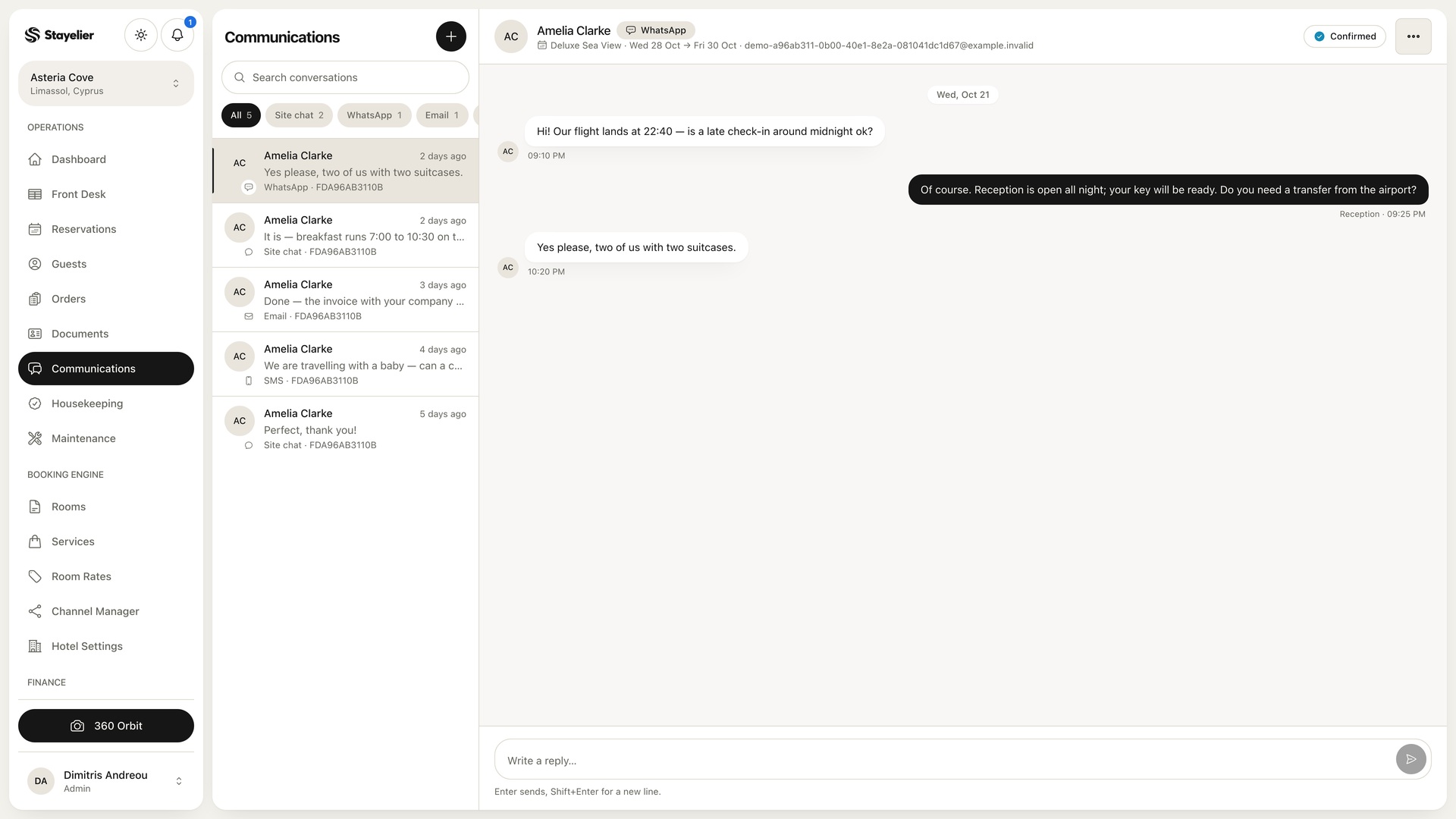
- Identify reservations, guest conversations and service orders that still require action.
- Name the colleague taking over each item and record the next action in the hotel’s agreed handover process.
- Have that colleague confirm access with their own authorised account before marking continuity work complete.
This is a continuity checklist, not a Stayelier access-removal procedure. Confirm account restriction, active-session handling and any reassignment options separately with the provider; the operational screens do not establish those controls.
4. Follow each provider’s access-removal procedure
Have the responsible administrator follow the system provider’s documented departure process. Ask what happens to active sessions, recovery methods, security credentials and connected applications when an account is restricted. Do not assume different systems behave alike.
Google Workspace illustrates why “password changed” is not a sufficient completion record. Its checklist separately covers recovery email addresses and phone numbers, authorized applications, sign-in cookies, security keys and application-specific passwords. For Google Workspace, administrators should review authorized applications and revoke the departing user’s access as Google directs.
Google Workspace: account, session and credential checks
Those details apply to Google Workspace, not automatically to a PMS or channel account. If a control is unavailable or unclear, record the question for that provider. For shared credentials, coordinate the replacement with remaining authorized users and confirm their access afterward.
5. Verify both outcomes before closing
Record the action performed, when it happened and who verified it. “Request sent to support” means pending, not complete. Give every unresolved item an owner and a follow-up time.
Hypothetical example: a departing reservations supervisor used a named PMS account and Google Workspace. The PMS administrator records the account action and verification using that provider’s procedure. The Workspace administrator separately records the checks of recovery email addresses, phone numbers, authorized applications, sessions and security credentials.
The reservations manager then confirms that the colleague taking over the work can access essential hotel documents using their own account and that open guest follow-ups have named owners. Any account deletion remains a separate decision after the necessary transfer checks.
Close the register only when access actions are verified and essential work is accessible to the remaining team. Keep unresolved exceptions visible rather than marking the whole departure complete.